Context Menu
The context menu lets you perform actions on nodes.
The Context Menu provides node and graph-level actions when you right-click on the canvas, nodes, edges, or selections. It displays different options depending on what you've selected.
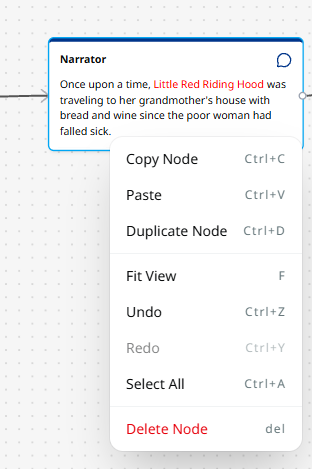
Actions
When right-clicking:
- Copy Node – Copy the selected node(s) and edges to clipboard (Ctrl+C)
- Duplicate Node – Create a copy of the node (Ctrl+D)
- Delete – Remove the selected node(s) and edges (Del/Backspace)
- Fit View to Selection – Zoom and pan to fit selected nodes
Graph-Level Actions
Always available regardless of selection:
- Paste – Paste clipboard contents (Ctrl+V)
- Undo – Revert the last action (Ctrl+Z)
- Redo – Redo an undone action (Ctrl+Y)
- Select All – Select all nodes in the graph (Ctrl+A)
Keyboard Shortcuts
Context menu actions are also available via keyboard shortcuts.